How to Add a Deferred Deep Link in Apptrove (Android SDK Guide)
With a deferred deep link in your Android application, users who previously clicked on a campaign link using your application will easily be sent to the intended area of the application after installing it. The manner in which a deferred deep link works enriches the overall user experience, helps improve the accuracy of campaign attribution and increases the performance of conversion rates.
This document serves as a full resource on implementing a deferred deep link utilizing the Apptrove Android SDK including requirements to complete the implementation, completing all configuration steps, coding the implementation, testing the implementation, and how to troubleshoot possible problems.
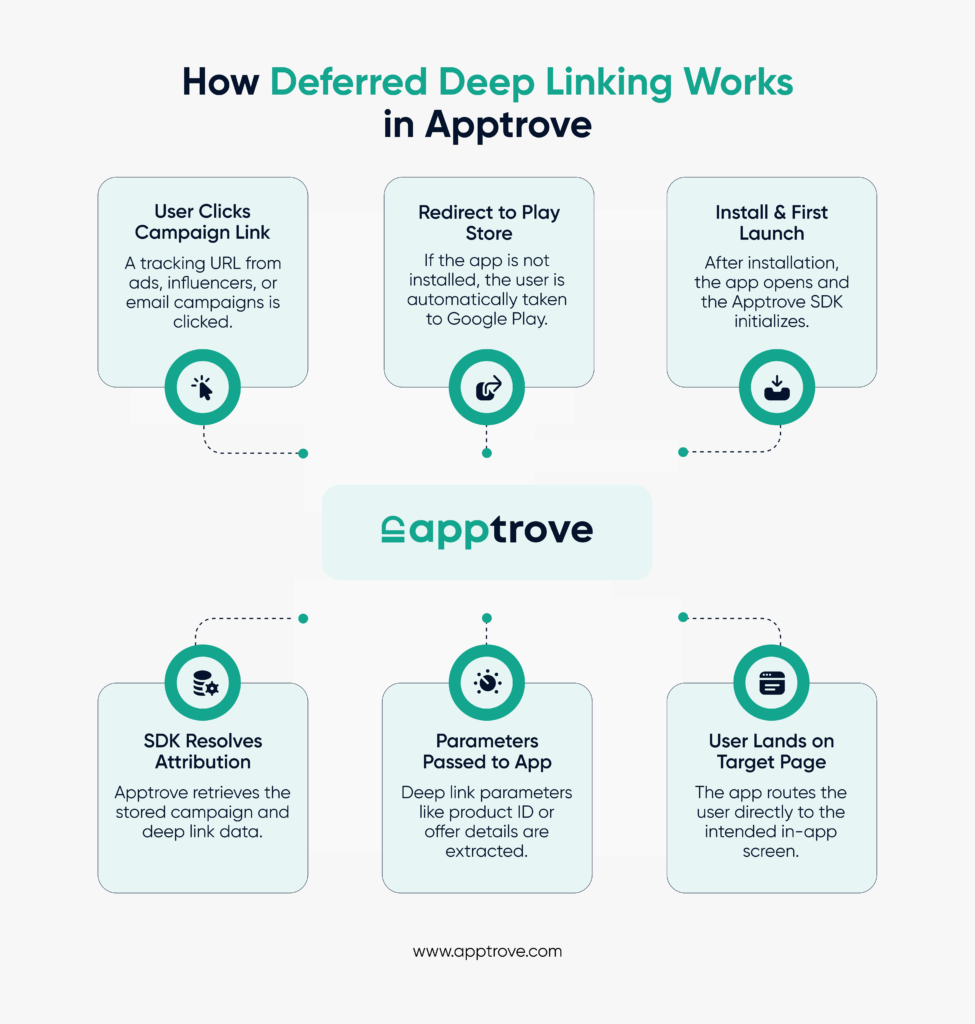
Defining a Deferred Deep Link
Using a deferred deep link allows the user to:
- Click a promotional or campaign link
- Where the user will be taken to the Google Play Store if the application has not been previously installed.
- The user will install and launch the application.
- The user will load the same in-app content referenced in the original link after having installed the application.
Unlike a standard deep link that will only funnel to the specific in-app area if the application is available prior to the link click, deferred deep links will funnel to the intended in-app page after the user has completed the installation of the app that coincides with the original deep link.
This functionality is critical to:
- New User Acquisition Campaigns
- Affiliate Marketing Campaign
- Retargeting Campaigns
- Influencer Traffic
- Re-engagement Campaigns through Email or Push Notifications.
Why Use a Deferred Deep Link in Apptrove?
Apptrove provides an option to integrate the Apptrove Android SDK with your application, making it easier than ever to create and manage deferred deep links.
Apptrove can automatically track installation attribution for your app when you join the Apptrove program and implement the Android SDK deferred deep links.
This means that regardless of the time between the user clicking on the deferred deep link and the user downloading and installing the application, the user will be able to access the intended destination in the application, whether that be a product page, an offer page, or a specific onboarding variation.
Prerequisites
To properly implement a deferred deep link, the following items must be completed:
1. The application must be using Apptrove Android SDK version 1.6.68 or later.
2. The application must run on Android API Level 19 (Android 4.4) or higher.
3. The application must be either published or listed in the Google Play Store.
4. The application must have Internet permissions enabled in the AndroidManifest.xml file.
5. The application must be properly configured for deferred deep link within the Apptrove dashboard.
6. The application must possess a valid SDK key associated with the Apptrove account.
Step 1: Configure Deep Linking in AndroidManifest.xml
The first step in enabling a deferred deep link is setting up the proper intent filter in your MainActivity.
Add the following inside your activity declaration:
<intent-filter>
<action android:name=”android.intent.action.VIEW” />
<category android:name=”android.intent.category.DEFAULT” />
<category android:name=”android.intent.category.BROWSABLE” />
<data
android:scheme=”https”
android:host=”yourtrackingdomain.u9ilnk.me”
android:pathPrefix=”/d/” />
</intent-filter>
Why This Is Important
This configuration allows Android to:
- Recognize incoming tracking URLs
- Launch your app when appropriate
- Pass the deep link data to your activity
Without this configuration, your deferred deep link cannot be captured.
Step 2: Capture and Forward the Deep Link in MainActivity
Once the intent filter is configured, you must forward the deep link to the Apptrove SDK for parsing.
Java Implementation
Intent intent = getIntent();
Uri data = intent.getData();
if (data != null) {
TrackierSDK.parseDeepLink(data);
}
Kotlin Implementation
val data = intent?.data
data?.let {
TrackierSDK.parseDeepLink(it)
}
This step ensures the SDK receives the URL and processes the deferred deep link properly.
Step 3: Initialize the SDK with a DeepLinkListener
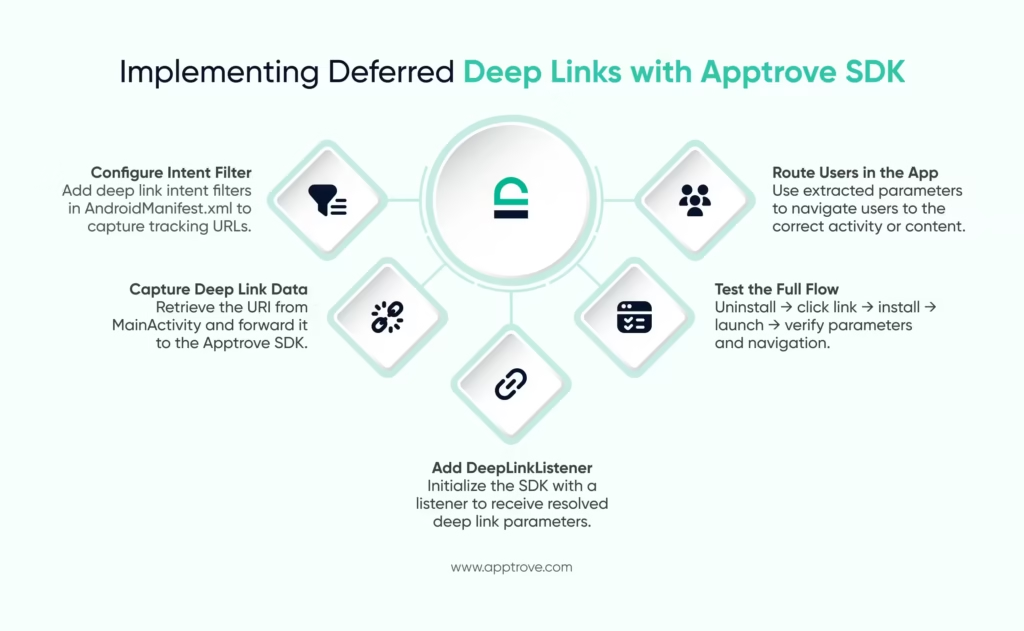
The most critical part of implementing a deferred deep link is setting up the DeepLinkListener. This listener receives the resolved deep link after installation and first launch.
Kotlin Example
val deepLinkListener = object : DeepLinkListener {
override fun onDeepLinking(deepLink: DeepLink) {
val intent = Intent(this@MainApplication, ProductActivity::class.java).apply {
putExtra(“productid”, deepLink.getQueryParam(“productid”))
putExtra(“quantity”, deepLink.getQueryParam(“quantity”))
flags = Intent.FLAG_ACTIVITY_NEW_TASK
}
startActivity(intent)
}
}
val sdkConfig = TrackierSDKConfig(this, “YOUR_SDK_KEY”, “development”).apply {
setDeepLinkListener(deepLinkListener)
}
TrackierSDK.initialize(sdkConfig)
What Happens Here
- The SDK listens for deferred deep link events.
- Once the link is resolved, parameters are extracted.
- The app navigates the user to the intended activity.
- Campaign parameters can be accessed via query params.
This is where the deferred deep link becomes actionable inside your app.
Step 4: Explicitly Resolve the Deep Link (Optional)
For debugging or advanced control, you may explicitly resolve a deferred deep link URL.
TrackierSDK.resolveDeeplinkUrl(“https://exampletrackinglink”) { resultUrl ->
Log.d(“Resolved URL”, resultUrl);
}
This method helps verify:
- Final redirect URLs
- Parameter integrity
- Campaign link correctness
Example Deferred Deep Link URL Structure
A typical Apptrove tracking URL may look like this:
https://yourtrackingdomain.u9ilnk.me/d/ABC123?pid=campaign1&productid=jeans&quantity=3
If the app has not been installed:
- User is redirected to the respective Play Store.
- The user will install the application.
- When the user first opens the app, the SDK will resolve the deferred deep link.
- The parameters will be passed to the application through the SDK.
The user will be routed to the ProductActivity.
This is how the Deferred Deep Link Flow works
- When the user clicks on a campaign link
- Then the Apptrove tracking server will record the attribution
- Then the user will be sent to the Google Play store
- Once installed, the first launch will trigger the SDK to initialize
- The SDK will retrieve the installation attribution
- The deep link listener will receive the parameters
- Then route the user as appropriate
This entire set of processes will ensure that the user’s deferred deep link will maintain the marketing context.
Testing of a Deferred Deep Link
Testing is important to validate the entire flow.
Step 1 – Uninstall the app from your device.
Step 2 – Click on your deferred deep link URL.
Step 3 – Verify you are directed to the Play Store.
Step 4 – Install the app.
Step 5 – Launch the app.
Verify the following:
1. The listener triggers.
2. The parameters are correct.
3. The correct activity opens.
4. No crashes occur.
To ensure reliability in your testing:
- Use a clean device or reset your advertising ID.
- Make sure your SDK key matches the environment (dev/prod).
- Ensure your deep link is properly configured within the dashboard.
Common Issues and Troubleshooting
1. Deep Link Does Not Respond
- Verify intent filter setup
- Make sure you initialize the SDK before you use the listener
- The link host and path must match the manifest
2. No Parameters
- Check query parameter for URL
- Make sure MainActivity is forwarding your deep link
3. Hit a Snag With Play Store Redirects
- Check your tracking link setup
- App package name must match what is listed in the dashboard
4. Listener is Not Being Called
- Check if SDK version is at least 1.6.68 or higher
- Check that there is an internet connection
- Check if your SDK key is valid
Best practices for utilizing deferred deep links to ensure the optimum performance and dependability:
Initialize the SDK in the application class
- Handle null parameters in a safe way
- Log out the deep link payload when testing
- Keep route logic separate from SDK initialization
- Consistently name your query parameters
- Validate campaign URLs before launching
When done correctly, a deferred deep link will improve your onboarding experience.
Use Cases for a Deferred Deep Link
A deferred deep link can be used to:
- Send users directly to a specific product page
- Offer time-sensitive promotions
- Trigger personalized onboarding flows
- Attribute influencer traffic
- Deliver referral rewards
- Resume abandoned cart flows
Security and Validation Considerations
When implementing a deferred deep link:
- Validate incoming parameters before use
- Avoid blindly trusting query data
- Sanitize product IDs and quantities
- Use secure HTTPS tracking domains
This protects against misuse and unintended routing.
Performance Impact
The Apptrove SDK resolves a deferred deep link asynchronously. To avoid delays:
- Avoid heavy processing inside the listener
- Use lightweight routing logic
- Defer API calls until navigation completes
Production Deployment Checklist
Before going live:
- Confirm SDK key is production-ready
- Validate tracking domain
- Test uninstall → click → install flow
- Confirm campaign attribution logs correctly
- Ensure activity navigation is stable
- Remove debug logs
Final Thoughts
Adding a deferred deep link in Apptrove is a structured process that requires proper SDK integration, intent configuration, listener implementation, and validation testing. When implemented correctly, it guarantees users reach relevant content even if installation occurs after link interaction.
This capability is critical for growth-focused mobile applications running acquisition campaigns. By following the steps outlined in this guide, you can confidently deploy a robust deferred deep link implementation that preserves attribution, improves user experience, and increases conversion rates.
If needed, this guide can be adapted into technical documentation, marketing content, or developer onboarding material.
We are delighted to have assembled a world-class team of experienced professionals who are ready to take care of your queries and answer any questions you may have.
Feel free to reach out to us at any time by emailing us at support@apptrove.com or by using the in-platform chat feature. We’d love to hear from you!
from Apptrove https://apptrove.com/how-to-add-a-deferred-deep-link-in-apptrove/
via Apptrove


Comments
Post a Comment