Google Tag Manager (GTM)
Introduction
Tracking things across all your apps & websites can be a mess! Each campaign you create needs a different script, the different analytics tools you use require different integrations, and even a simple change to tracking can take days to implement if you are relying on developers.
That’s why Google Tag Manager is important.
Google built Google Tag Manager to enable you to have complete control over your tracking environment. Instead of adding many tracking codes manually, you now manage everything from a single interface faster, neater, & with fewer mistakes.
For app marketers and growth teams, this means you can launch new campaigns more quickly, measure their effectiveness more rapidly, & improve user journeys more efficiently. Combined with advanced attribution solutions like the ones detailed in Apptrove’s mobile marketing analytics guide, it is the foundation of a scalable tracking solution.
What is Google Tag Manager?
In essence, Google Tag Manager (GTM) is a TMS tool that enables businesses to create and manage tracking code on their site (or any online marketing asset) without having to change any coding directly. Each tag is similar to a small code snippet that collects information and sends it to one of many different services, such as Google Analytics or various advertising providers.
With GTM, instead of having an individual script installed on every page of your site, there is only one (the GTM container). Once the GTM container is installed, all count the timestamps can be managed via the GTM Admin interface.
Therefore you will:
- Reduce reliance on developer personnel
- See significantly quicker deployment times for tracking
- Manage clean and organized scripts
Google Tag Manager Meaning (Simple Explanation)
The Google Tag Manager meaning can be understood in practical terms:
It is a tool that allows you to manage your tracking codes in one place, making it unnecessary to edit the code of your site every time you want to add or change a tracking code.
You can think of the Google Tag Manager as a control center for managing your marketing and analytics tracking. Instead of managing many different tracking scripts individually, Google Tag Manager handles everything through one central system.
How Does Google Tag Manager Work?
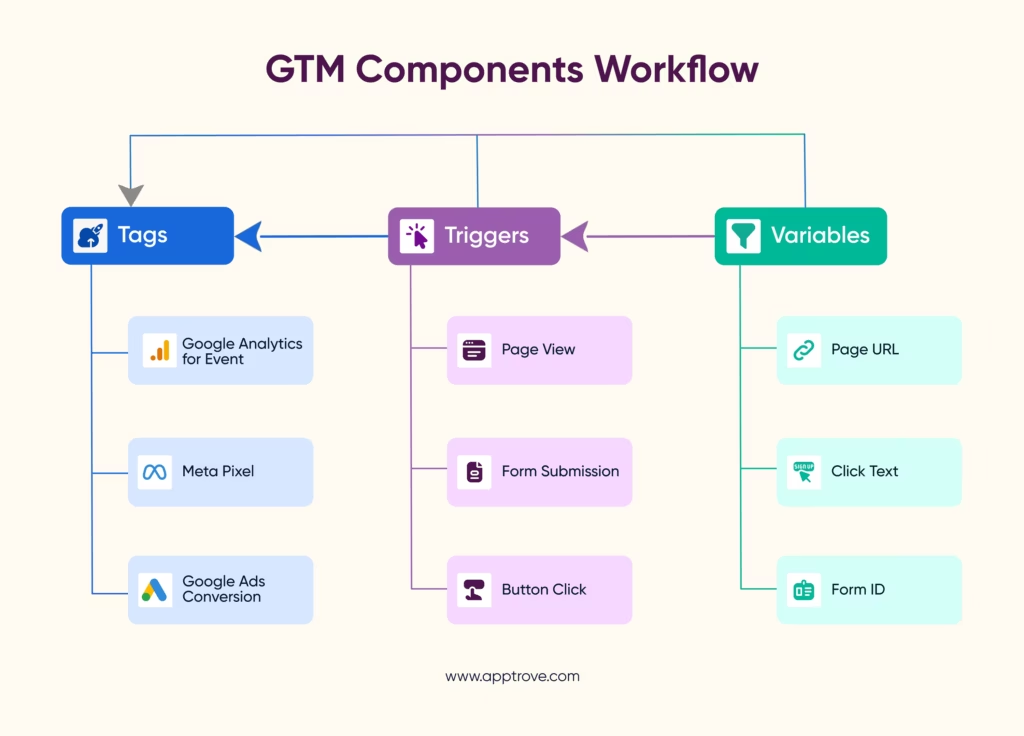
At its core, Google Tag Manager connects user interactions on your website or mobile app to the tools that use that data. The idea is simple, but the underlying system architecture is built to be accurate and flexible.
1. The GTM Container (The Foundation)
The first step in leveraging Google Tag Manager is integrating a container on your website. The container is essentially where you keep everything you need for tracking purposes. Once the container is added, you can add or edit tracking without having to make updates to your web site code.
2. Tags (What Gets Executed)
Tags are what create the actual bits of code that collect and send data. Examples of tags include:
- When a user lands on a page, this would be tracked with a tag.
- When a button is clicked, it will be tracked with a tag.
- After a purchase is made, this will fire the conversion tag.
Rather than viewing tags simply as code, it’s better to view them as pieces of data with a purpose, i.e., to collect data for very specific marketing efforts.
3. Triggers (When It Happens)
Triggers dictate when a tag is to be executed. Examples include:
- When a webpage is fully loaded, this page view trigger will execute the associated tag.
- When a button is clicked, the associated click trigger will execute the tag.
- When a user scrolls down a page, the associated scroll trigger will execute the respective tag.
Trigger ensures that data is collected at the correct time and not randomly throughout a web page by executing a tag at the moment the trigger occurs.
4. Variables (What Data is Captured)
Variables hold information that will change, which will be used in conjunction with tags and triggers. Examples include:
- Page URL
- Click text
- Device type
Variables help make your tracking smarter, in that they allow you to capture relevant data dynamically rather than statically.
How to Use Google Tag Manager (Step-by-Step Guide)
Understanding how to use Google Tag Manager becomes easier when broken into clear steps. While the interface may seem technical initially, the workflow is structured and logical.
Step 1: Create a Google Tag Manager Account
The first thing to do is create a Google Tags Manager Account.
You have to:
- Enter your business name
- Create a Container (Web, iOS, Android)
Once completed, you will be provided with a container snippet to install on your website.
Step 2: Install the GTM Container
Now you need to install the Container snippet on your website.
You only have to set up the Container once; after that:
- The GTM will be live
- You can manage tracking without touching your code again.
Step 3: Add a Tag
You need to create a tag in GTM.
Examples:
- Tracking Page Views
- Tracking Conversions
- Integrating with Analytics
This step replaces inserting scripts manually using code.
Step 4: Set Up a Trigger
Define when do you want your tags to fire?
Examples:
- On Page Load
- When You Click a Button
- On Form Submission
Triggers will ensure that tracking will happen at the right time.
Step 5: Configure Variables
Variables allow you to collect additional data such as:
- Page URL
- Click Text
- User Activity
Variables make tracking actions more dynamic and meaningful.
Step 6: Test in Preview Mode
Before publishing, you want to test your setup to ensure that:
- Tags fire properly
- No duplicate tracking occurs
- All data is correct
Step 7: Publish Changes
Once you have verified all items above, you will publish your Container.
And once you publish your Container, your data will start flowing into Google Analytics or other tools.
Key Features of Google Tag Manager
Centralized Tag Management
Using Google Tag Manager allows you to control all tracking codes through an integrated interface. This saves you time looking through your website’s source code for particular scripts.
Centralizing multiple campaigns run by teams ensures consistency and makes troubleshooting easier.
No-Code or Low-Code Implementation
The biggest benefits of Google Tag Manager are reducing reliance on developers to add tags; adjust triggers; and modify tracking logic without requiring the writing of complex code. This speeds execution times and allows faster experiments to be conducted.
Preview and Debug Mode
You can preview your changes using preview mode before publishing them. This allows you to:
- check if the correct tags are firing
- find configuration errors.
- confirm correctness of your data.
If you don’t test, even the smallest mistakes can cause incorrect data.
Version Control and Rollbacks
Every change to Google Tag Manager is saved as a version. This allows you to track changes made since the last time you saved the version and determine who made each change and allow reverting back to a previous version of that Tag.
This ability is extremely useful for teams who manage more complex tracking setups.
Seamless Integrations
Google Tag Manager works seamlessly with:
- Google Ads
- Analytics tools
- Third-party marketing tools
This allows you to use these different tools and strategies without having to worry about adapting your tracking system each time.
Benefits of Google Tag Manager
1. Faster Campaign Execution: You can track your campaigns immediately by implementing your tags without any development delay.
2. Reduced Errors: Google Tag Manager reduces the potential for incorrect or duplicate tracking by creating a production standard for the deployment of tags in addition to minimizing the risk of errors through standardization.
3. Better Collaboration: On the initial set-up of your tracking, developers perform the task and marketers provide the ongoing tracking. This will provide greater collaboration and efficiency across the teams.
4. Scalability: As the business expands, your tracking needs will grow as well. GTM allows you to scale your tracking without adding additional code to your codebase.
5. Improved Performance Management: GTM is better at managing scripts compared to having multiple scripts manually added on your website.
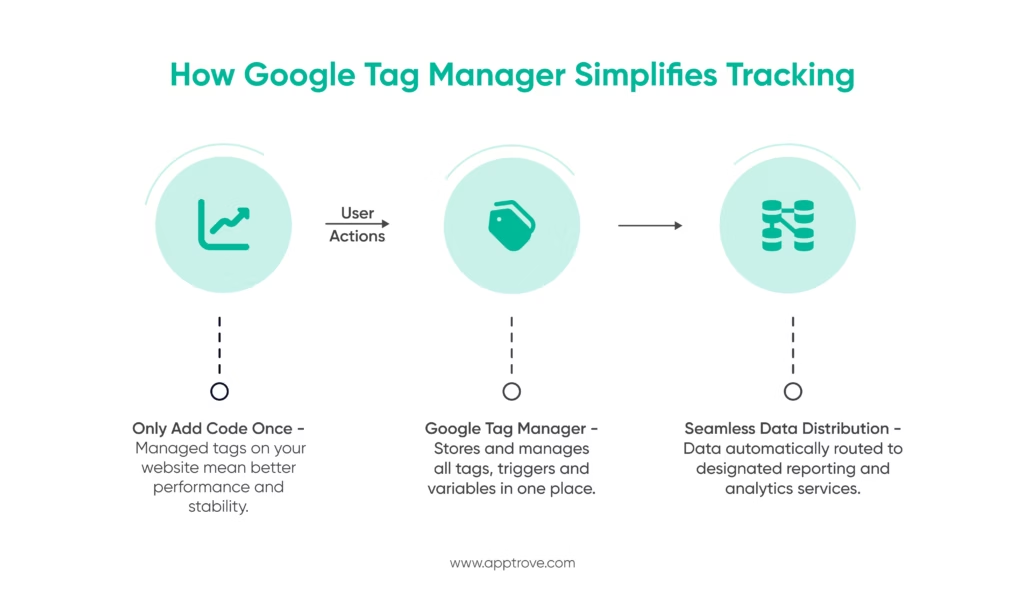
How Google Tag Manager Simplifies Tracking
Many tracking methods used to be pieced together before using Google Tag Manager, where each program would have to have its own script, and anytime there was an update, it would also take coding to make that happen.
As a result of this fragmentation, it created:
- Campaigns took longer to execute
- Increased reliance on developers
- Higher chances of tracking errors
With Google Tag Manager:
- You have one container instead of many scripts
- Management of the tags is all done in a dashboard format
- When it needs to be published, it can be completed right away.
This singularly coordinated approach allows team members to emphasize strategy over technical implementation.
Difference Between Google Tag Manager and Google Analytics
Google Tag Manager: It lets you control and distribute advertising tags on your webpage without changing the code.
Google Analytics: It delivers data and analytical capabilities for SEO and advertising reasons.
Best Practices for Using Google Tag Manager
- Adhere to naming conventions to ensure clarity and consistency
- Regularly review for unused tags
- Test all changes before publishing them
- Keep track of the data that has been duplicated
- Organize your tags into folders
All of these practices contribute to a clean, reliable tracking setup.
Limitations of Google Tag Manager
- Beginners will have to learn how to use it; therefore, getting started will require time
- Configuring advanced tracking in Google Tag Manager can require quite a bit of time
- Google Tag Manager cannot provide attribution information on its own
- Any misconfiguration in Google Tag Manager can lead to poor data quality
Conclusion
Google Tag Manager is a great tool for tracking management and simplifies tracking implementation and management processes significantly.
Google Tag Manager allows marketers and developers to execute tracking faster, have fewer errors and allows for greater flexibility than traditional approaches. However, Google Tag Manager is just one of the tools that comprise an entire tracking ecosystem.
If organizations want to gain a thorough understanding of their users’ journeys and the performance of their marketing campaigns, they should incorporate Google Tag Manager into an advanced analytics and attribution solution.
What’s The Next Step?
Start by implementing Google Tag Manager correctly, then build a more advanced tracking stack around it.
FAQs
1. What is Google Tag Manager used for?
Google Tag Manager simplifies the management and deployment of tracking codes for analytics and marketing. With it, tracking can be implemented much faster, more easily, and with less reliance on developers than if, each time a tracking code is required, you had to edit the website’s source code.
2. Is Google Tag Manager free?
Google Tag Manager is free and widely used by many organizations to implement tracking and analytics systems.
3. What is the difference between Google Tag Manager and Google Analytics?
Google Tag Manager is the tool for deploying tracking codes, and Google Analytics is a reporting tool used for processing and analyzing the data generated by the tracking codes.
4. Do I need coding knowledge to use Google Tag Manager?
Having a foundational knowledge of coding is beneficial, but you do not need to be proficient in coding to use most of the capabilities of Google Tag Manager through its interface.
5. Can Google Tag Manager slow down my website?
When implemented correctly, Google Tag Manager will not slow down the speed of your website and can contribute to the improved efficiency of managing scripts.
6. Is Google Tag Manager necessary?
You are not required to use Google Tag Manager; however, it is strongly recommended for businesses looking for scalable, flexible, and efficient tracking.
from Apptrove https://apptrove.com/what-is-google-tag-manager/
via Apptrove


Comments
Post a Comment