What is an IP Address?
If you have ever asked yourself, “What is an IP address?” you are definitely not the only one. Every device that connects to the Internet, such as your smartphone, laptop, smart TV, and/or tablet, uses the Protocol to send and receive information. For this reason, those who work in App Marketing, Mobile Attribution, Cyber Security, and/or Digital Advertising should understand what an IP Address is.
So what is an IP address? An IP address is simply a unique numerical identifier assigned to every computer or device on a network that communicates over the Internet through the Internet Protocol. Think of the IP Address like the digital address of your house. Without the digital address from each end of the transmission, no one would know where to send the data packets they create or receive. Therefore, by 2026, knowing about IP Addressing will be the most basic form of knowledge for professionals and everyday consumers alike.
What Does “IP Address” Stand For?
Internet Protocol (IP) is the set of guidelines that define how data is sent and retrieved through the Internet. So, what is an IP address in technical terms? An IP address is an identification number for a device within a given computer network.
Many types of devices connect to a computer network, such as smartphones, laptop computers, routers, and servers; however, all devices on the same network must have at least one IP address to allow them to communicate with one another.
An IP address has two functions:
- To identify a device as either a host or a network interface
- To provide a location where the device is on the network.
Types of IP Addresses: A Glossary of Key Terms
To truly understand what you need to know its many forms. Below is a comprehensive glossary covering every major type and related term.
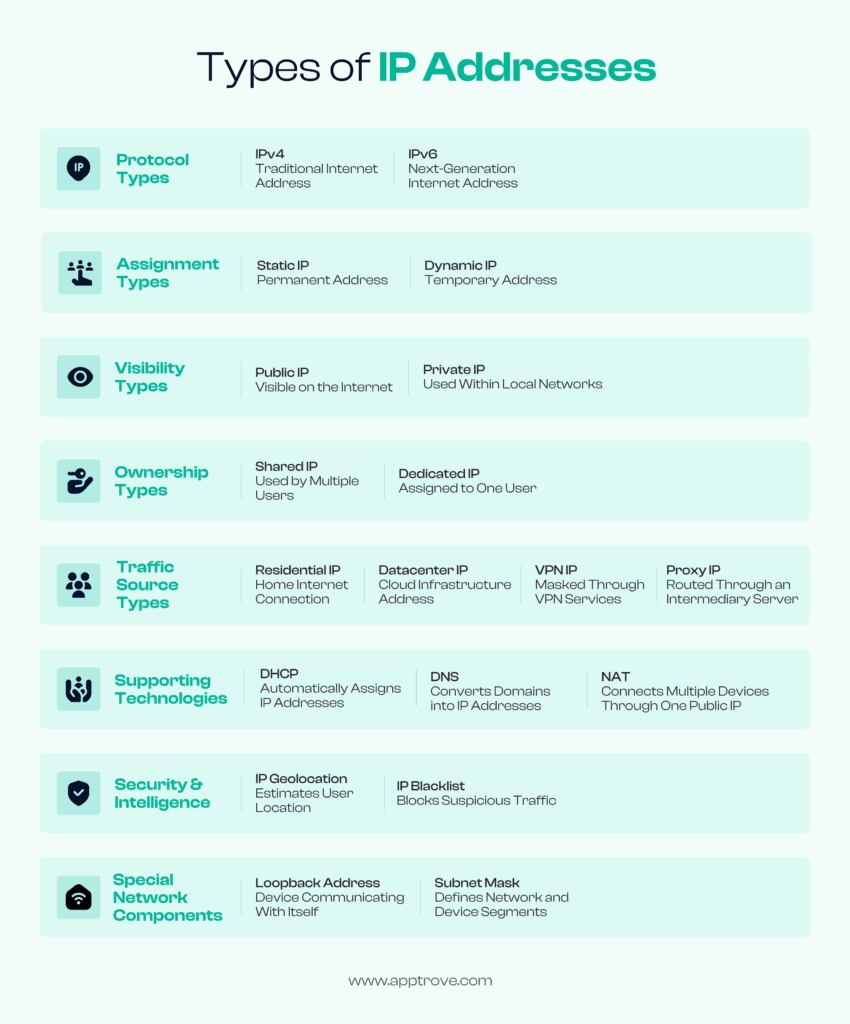
IPv4 (Internet Protocol Version 4)
IPv4 (Internet Protocol Version 4) – IPv4 is the fourth version of the Internet Protocol and the most widely used version of the protocol for the assignment of IP addresses. An IPv4 address is composed of four groups of decimal numbers separated by periods. Each of the four groups can contain a decimal number from 0 to 255 (for example, 192.168.1.1). The total number of addresses available in IPv4 is approximately 4.3 billion. Because of the rapid increase in devices connected to computer networks, the IPv4 address space has been exhausted.
IPv6 (Internet Protocol Version 6)
IPv6 is a new version of the Internet Protocol used to replace IPv4 and solve the problem of running out of IP addresses. IPv6 addresses are written as 8 groups of hexadecimal numbers separated by colons (e.g., 2001:0db8:85a3:0000:0000:8a2e:0370:7334) and support virtually unlimited amounts of addresses, which will accommodate all devices on Earth for as long as possible.
Static IP Address
Static IP addresses are permanent IP addresses assigned to a device (manually) that will NOT change. They are useful for servers, websites, and email systems (to provide the same level of access at all times).
Why this is important for app marketers: Static addresses are usually associated with businesses and data centers; therefore, they can help with fraud detection and analysis of traffic quality by app marketers.
Dynamic IP Address
Dynamic IP addresses are assigned each time a device connects to a network by the DHCP server (Dynamic Host Configuration Protocol). Most home internet and mobile devices are assigned dynamic IP addresses that can change every time you connect to a new network, or sometimes multiple times per day.
Public IP Address
Public IP addresses are assigned to your network by your Internet Service Provider (ISP) and are visible to all websites, applications, and any computer/server located outside of your network. All devices on your home/office network normally use the same public IP address.
Private IP Address
Private addresses are used internally by your local network, but are not intended to be accessed from outside of the local internet. Routers will utilize the private addresses to contact the devices connected to the internal portion of the network. Some examples of common ranges for private addresses are as follows:
- 10.0.0.0 – 10.255.255.255
- 172.16.0.0 – 172.31.255.255
- 192.168.0.0 – 192.168.255.255
Shared IP Address
A shared IP address can be used by multiple websites or multiple users at the same time. Web hosts often share an IP address between several different websites on the same server, so they are able to save money on infrastructure expenses.
Dedicated IP Address
A dedicated IP address is an IP address that has been assigned to one user, one website or one device. A user that requires a consistent level of deliverability and reputation control, such as a large business, an e-commerce business, or an email marketer, typically chooses to use a dedicated IP address.
Loopback Address
The loopback address (in IPv4: 127.0.0.1) is a special IP address that allows a device to refer back to itself. This is often used by software for testing purposes, to avoid sending any traffic outside of the local network.
Subnet Mask
A subnet mask is used in conjunction with an address to determine which portion represents the network and which portion represents the individual device. An example of a subnet mask is 255.255.255.0.
DHCP (Dynamic Host Configuration Protocol)
Dynamic Host Configuration Protocol (DHCP) automatically assigns IP addresses to devices. When you connect your phone to Wi-Fi, the DHCP server on your router assigns it an available address from a pre-configured pool.
DNS (Domain Name System)
The Domain Name System (DNS) is often referred to as the “phone book of the internet.” It translates human-readable names (like apptrove.com) into the numerical address (IP address) that the computer and network need in order to connect to the website. Without DNS, users would have to remember numbers instead of names in order to go to websites.
NAT (Network Address Translation)
The purpose of Network Address Translation (NAT) is to allow a router to map many private addresses within a local network to one public address. NAT has allowed IPv4 to last as long as it has because one public address can be used for thousands of devices located in a home or office.
IP Geolocation
Geolocation allows the user to obtain an approximate location of the device in the real world. For example, the user can obtain the approximate city, region, or country the device is located in by using their IP address. Many companies utilize this information to target their advertising, prevent fraud, and personalize their content to the user.
Note: Geolocation is an approximation. For example, some mobile devices may be geolocated to the ISP’s data center location instead of the user’s actual physical location.
IP Blacklist / Blocklist
An IP blacklisting is a list of IP addresses that people have identified as being related to spam or bot traffic or malware, or traffic produced in conjunction with some type of fraud. The purpose of blacklisting is to prohibit unwanted traffic from flowing through network devices such as email servers and ad networks.
Residential IP
A residential IP address is an IP address assigned to a person at a residential location by an ISP. Advertisers tend to regard residential IPs as trustworthy when it comes to digital marketing and advertising because they represent individuals rather than being from a data centre or a bot (think of a residential IP as an identifiable person, rather than a machine).
Datacenter IP
A datacentre IP address is an IP address originating from a cloud service provider (like a cloud-based hosting platform – e.g., AWS, GCP). Datacentre IP addresses are typically associated with automated traffic (bots) and with traffic coming from a VPN or from proxied traffic, and are a major red flag when measuring the effectiveness of mobile ads.
VPN IP
VPN IP addresses are IP addresses assigned to users connecting to a server using a Virtual Private Network (VPN). When a user connects to the Internet through a VPN, their actual IP address will be hidden or masked by the VPN provider’s IP address. This can also lead marketers to incorrectly assign users to countries or other networks different from where they actually are located.
Proxy IP
Proxy IP addresses are created by proxy servers, which pass user requests through the proxy server and back to the requester. There are both legitimate and illegitimate cases for the use of proxy servers. Legitimate uses of proxy servers are typically for corporate security, and illegitimate uses of proxy servers are for click fraud and install fraud.
How Does It Work?
Now that you understand what is an IP address in its many forms, here is how it functions in a real-world interaction:
- You open an app or visit a website. Your device sends a request from its address to a DNS server.
- The DNS server translates the domain name into the destination server’s numerical address.
- Your device and the destination server exchange data using both addresses to route packets correctly.
- The server sends the requested content back to your device’s address.
This entire process happens in milliseconds and underpins every digital interaction you have.
Why It Matters in App Marketing & Mobile Attribution
For app marketers, advertisers, and mobile measurement professionals, understanding what is an IP address goes beyond theory; it has direct commercial and compliance implications.
Identifying Fraud: A user’s datacenter address or possibly being blacklisted or having a known VPN/proxy IP address is a strong indicator of fraudulent traffic or install fraud (i.e., providing fake clicks). MMPs use address analysis to filter out invalid clicks in real-time.
Geo-targeting: Using address data for geo-location, advertisers can now create location-based advertising campaigns (i.e., ‘By Country’) to maximise their advertising spend.
User Signals: Address data combined with device signals is used by attribution platforms to identify real users versus bots and to identify suspicious clustering (e.g., if there are hundreds of installs from one datacenter address, then this may indicate the use of emulators).
Privacy Compliance: Under GDPR, CCPA, and other privacy regulations, an address is classified as personal data in many jurisdictions. Proper handling, anonymization, and consent management are legal obligations for any app business operating in regulated markets.
Summary
Understanding what is an IP address is no longer just a technical curiosity; it is practical, commercial knowledge. From routing everyday web traffic to powering fraud detection in mobile advertising, the concept sits at the heart of how the internet works. Whether you are an app marketer tracking campaign quality, a developer building network-aware features, or a privacy professional managing compliance, a clear grasp of what is an IP address, and its many types is an indispensable part of your toolkit in 2026.
FAQs
What is an IP address in simple terms?
It is a unique numerical label assigned to every device on a network, functioning like a digital home address so that data knows where to go and where it came from.
What is an IP address used for in advertising?
In digital advertising, it is used for geo-targeting, fraud detection, traffic quality analysis, and user segmentation. It helps platforms tell real users apart from bots.
What is an IP address, and can it reveal my exact location?
No. It can indicate a general area (often the city or region of your ISP), but it cannot reveal your home address or precise physical location.
What is an IP address’s role in privacy law?
Under regulations like GDPR, an address is treated as personal data because it can be linked to an individual. Businesses must handle it lawfully, with proper consent and data minimization practices.
What is an IP address, static or dynamic, and which do I have?
Most home and mobile users have a dynamic address that changes regularly. Static addresses are typically reserved for businesses and servers. You can check your current public address by searching “what is my IP” in any browser.
What is an IP address, and the difference between IPv4 and IPv6?
IPv4 uses 32-bit numeric addresses (e.g., 192.168.1.1) supporting ~4.3 billion unique values. IPv6 uses 128-bit alphanumeric addresses supporting a virtually unlimited number, designed for the modern era of billions of connected devices.
What is an IP address in the context of VPNs?
When using a VPN, your real address is hidden and replaced with the VPN server’s address. This masks your location and identity from the websites and apps you visit.
from Apptrove https://apptrove.com/what-is-an-ip-address/
via Apptrove


Comments
Post a Comment