How to Set Up a Branded Domain in Apptrove?
Users typically first engage with your company via the tracking link. Instead of delivering a generic URL, you can provide a branded URL to enhance the user’s experience, add trust, and build upon your brand awareness. By creating a branded domain, you will create a more professional appearance for attribution links.
Setting up your branded domain in Apptrove is easy to do, whether you are looking to achieve improved link credibility or want to have a better-organized marketing effort. Use this guide to help you understand how to accomplish this task.
What is a Branded Domain?
A branded domain (sometimes referred to as a white-label domain) allows a business to change its generic tracking URLs to a custom domain. Instead of using a standard tracking URL, your links can show your company name, providing authenticity and brand consistency to every URL that your company shares.
For example, instead of displaying the default tracking link, approval. u9link.me, you could configure a custom URL (tracking.yourbrand.com). This will create a much stronger brand presence for your company and provide more confidence to the user when they click on a link.
In addition to aesthetics, the use of a branded domain will help create cleaner tracking, assist in the accuracy of attribution, and aid
Why Should You Use a Branded Domain?
Using a branded domain offers several practical advantages for businesses that rely on attribution links and digital marketing.
Reinforce Brand Identity
Every customer touchpoint matters. Customizing your tracking URLs with your company’s name helps create a consistent brand experience across campaigns and communication channels.
Improve Link Credibility
Generic tracking links may appear unfamiliar to users. A recognizable domain builds confidence by clearly identifying your business, making links appear more reliable and professional.
Prevent Domain Spamming
Using your own domain helps reduce dependency on shared tracking domains while supporting a cleaner link structure for your marketing activities.
Enhance Marketing Attribution
A branded domain improves attribution by making it easier to differentiate traffic sources and maintain organized tracking across campaigns.
How to Configure a Branded Domain in Apptrove
Setting up a branded domain requires only a few simple steps within your Apptrove account.
Step 1: Open the Branded Domain Settings
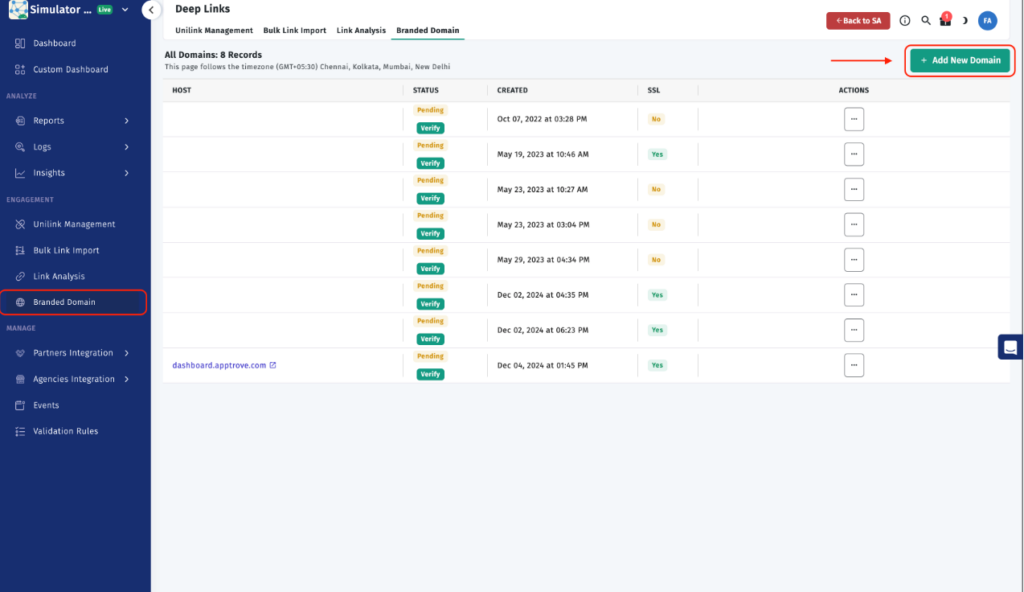
Begin by signing in to your Apptrove account.
After logging in, navigate to the Engagement section and open the Branded Domain settings page. This is where you’ll manage and configure your custom tracking domains.
Step 2: Add Your Domain
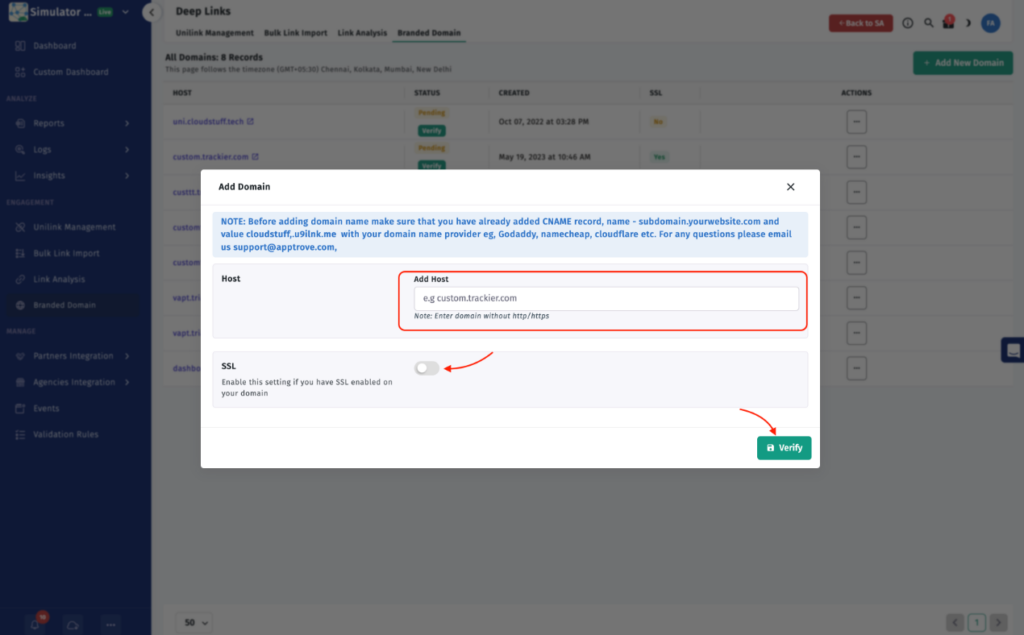
Click Add New Domain to start the configuration.
Enter the domain you want to use, including either http:// or https:// as applicable. Once you’ve entered the address, select Verify to validate the domain before saving the configuration.
Before performing this step, ensure that the required CNAME record has already been added with your domain provider. This configuration should be completed through your DNS management service, such as GoDaddy, Namecheap, Cloudflare, or another supported provider.
Verifying the domain confirms that your DNS settings have been configured correctly and prepares the branded domain for use within Apptrove.
Step 3: Enable SSL
If your custom domain supports SSL, enable the SSL option during the setup process.
Once everything has been configured, click Save to complete the setup.
SSL is highly recommended because it creates secure tracking links while increasing user trust. Secure URLs also contribute to a more reliable browsing experience for customers interacting with your marketing campaigns.
Best Practices Before You Finish
Before completing the setup, make sure your DNS configuration is already in place. The required CNAME record must be added with your domain provider before attempting verification inside Apptrove.
If SSL is available for your domain, enabling it is a valuable step toward providing secure and trustworthy tracking links. After verification and configuration save, your branded domain will be ready for use in attribution links.
Conclusion
Configuring a branded domain is a quick yet valuable enhancement for businesses that want their attribution links to reflect their brand identity. Instead of relying on generic tracking URLs, you can present professional-looking links that inspire greater confidence while supporting cleaner attribution.
With only a few setup steps, adding your domain, verifying it, configuring DNS records, and optionally enabling SSL, you can start using a branded domain that strengthens your brand presence and improves the overall tracking experience.
from Apptrove https://apptrove.com/how-to-set-up-a-branded-domain-in-apptrove/
via Apptrove


Comments
Post a Comment