How to Configure Preload Referrer Attribution in Apptrove?
To run the preload advertising initiatives, marketers can engage many users without using classic internet advertising campaigns. People will be able to make sure that all applications which they install on various new devices are associated with the correct advertisements due to the preload attribution system working for them.
The Google Play Auto Install (PAI) load attribution flow
Google Play Auto Install incorporates ID checks. This means that once people switch on their devices, certain installing happens automatically.
1. Device activation
When users switch on their devices for the first time, specific applications will be downloaded automatically from the cloud and installed on their devices according to the regulations that have been created by the advertiser in advance.
2. Application run
When users start the application that comes with the device, the Apptrove SDK uses the Google Play Referrer API to obtain the needed data.
3. Attribution process
Using the received information concerning the source of the application, Apptrove is able to realise which advertisement has brought the customer to the installation of this application.
- Media Source: Partner ID
- Match Type: preload_pai
- Campaign Name: preload campaign by <preloadpartner ID>
This procedure provides for the assignment of installation to the respective preload partner.
Preload Attribution Flow
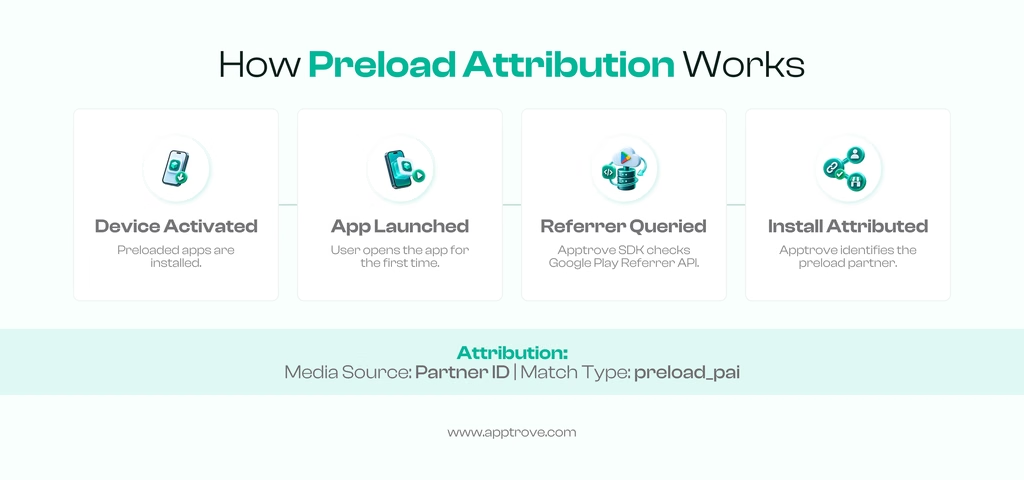
The total process of preload attribution can be explained in the following four points:
- A device is activated for the first time.
- The specific applications are pre-installed in the Google Play Store.
- The user uses the application for the first time.
- The Apptrove SDK uses Google Play Referrer API for performance attribution of the installation.
Preload Attribution Method
For PAI campaigns the partner needs to set up media source information in the Google Play Referrer API.
utm_source=play-auto-installs&utm_medium=preload&utm_campaign={partnername}_oempai
The following parameters contain the data necessary for identifying a preload source and campaign within an attribution process.
Configuring the OEM Campaign
If we work with OEM campaigns that are not part of the preload flow, necessary configurations should be made separately.
Configuring Postbacks
Today, it is possible to configure necessary postbacks in the process of account configuration.
Using different parameters in our attribution links, we get an opportunity to conduct a more precise analysis.
Different parameters that can be modified:
Campaign
Insert a Campaign parameter into the attribution link when comparing different campaigns running alongside ads.
Ad Set
Ad Set parameter should be used for naming ad sets and comparing different ad sets during the campaigns.
Ad Name
Ad Name parameter can be used for distinguishing certain creatives within the specific ad sets.
Site ID and Sub Site ID
Site ID parameter should be used when we want to attribute installs to particular publishers. Besides, Sub Site ID could be used for attribution as well.
See the related postback macro documentation for further details about the postback macros.
APK hardcoding
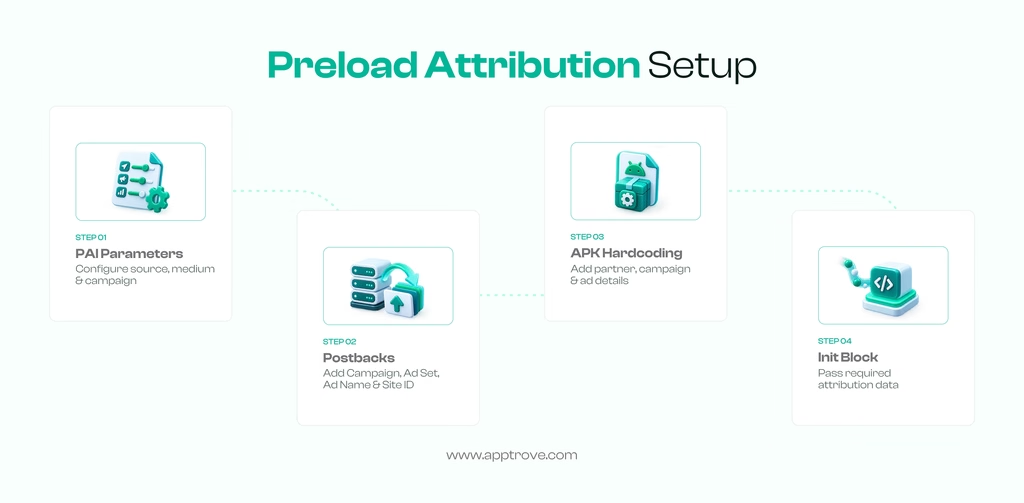
Another way is to hardcode information like the name of the partner, partner ID, campaign, advertisement, etc. into the APK that will be sent to the users. This method makes it possible to attribute the installation to the right partner. When working with the advertiser, you ask them whether they can send the necessary information via the init block of their application.
With the right preloads, Google Play Referrer information, postback parameters, or APK-level settings, you can be sure that Apptrove is provided with the necessary information for the correct attribution of the installation.
Final thoughts
Preload campaigns allow advertisers to distribute apps by downloading them at the device level, eliminating the need for traditional online campaigns. Implementing the appropriate attribution setup will allow Apptrove to track app installations from preload partners by using the Google Play Referrer API for data collection.
Installing all necessary PAI parameters, postback details, or APK hardcodes will result in having the attribution data being available for further analysis at the level of partners and campaigns.
from Apptrove https://apptrove.com/how-to-configure-preload-referrer-attribution/
via Apptrove


Comments
Post a Comment