Operating System
What is an Operating System?
Regardless of the fact that you are turning your laptop on, utilizing a mobile software program, saving a document, connecting to Wi-Fi, or playing a game, the operating system is working silently. You probably do not even notice it, since the system is working perfectly. At the same time, the role of the operating system in the world of technology should not be underestimated.
The operating system is a basic software program that enables the proper operation of any computer and ensures an interface for the user to use the applications. The operating system acts as a mediator between the hardware and software and carries out numerous interactions.
What functions does it perform? For instance, how does it manage files, applications, and devices at the same time?
What Is an Operating System?
An OS is system software that manages computer hardware and software components, including services for users and applications. It is in charge of many operations, including memory management, process control, file management, device communication, security, and interaction with users.
Think of the operating system as the head of a crowded restaurant. In this case, hardware can be seen as the kitchen, software is regarded as chefs making different dishes, and users are customers who give their requests. The operating system includes everything needed to organise every process, ensure resources are used properly, and make sure everyone gets what they need without causing chaos.
Without an OS, each application would have to know how to communicate with hardware, deal with critical information, establish memory management, and compete with other processes in conducting their activities.
What Makes Operating System So Important?
The operating system brings together all functions that may be performed by hardware, thus eliminating the necessity for all information about devices. Instead of controlling the whole set of physical components, an application can simply ask for storage, memory, camera, printer or connection to the network through the operating system.
This concept is probably one of the most significant concepts in modern computers. It helps developers create software compatible with a specific OS because they will not have to create a new operating system for every device.
How does the operating system work?
When you switch on a computer, the operating system is downloaded to memory and starts controlling the system. It manages communication with the main hardware parts of the system, initiates system processes and prepares everything needed for the user to work.
Once the system is loaded, the operating system keeps on operating. For example, when you launch an Internet browser, it allocates some memory and processing capacity for this program. When you download something on your computer, it is in charge of the storage. When you plug your headphones into the computer, it is in charge of communication between the device and the software.
All this is taking place at the same time when the operating system is managing many other processes.
Operating System as a Resource Manager
Computing resources are limited. There is a limited amount of RAM, computing power, storage capacity and transmission capabilities. Different software applications can ask for the same resources at the
The operating system determines the allocation of resources, including which processes will receive CPU time, how much memory each application can use, physical storage of files, and communication between different hardware and software.
This ability to manage resources represents the main function of the operating system.
Key Operating System roles
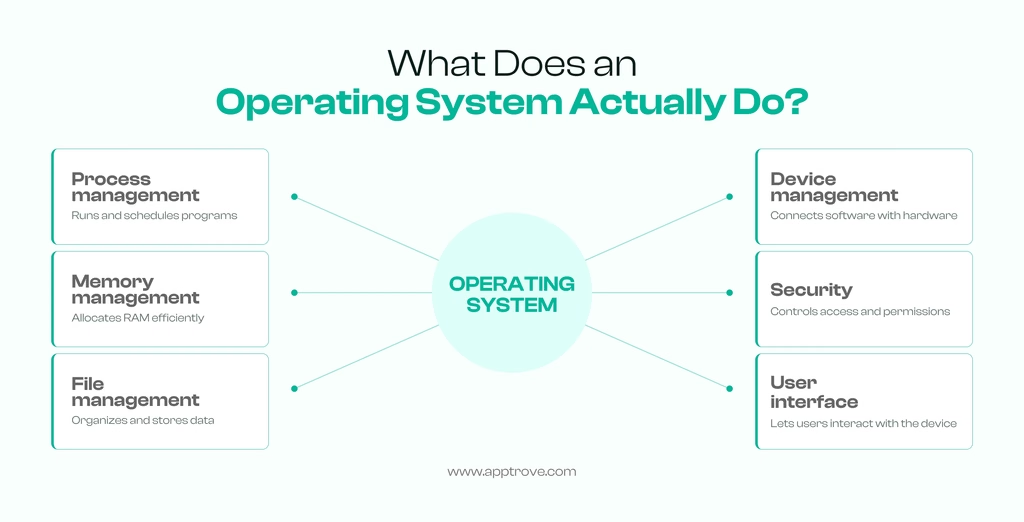
Operating systems have several different functions, but there are some core functions which appear in virtually all modern operating systems.
Process Management
A process is a program that is currently running. Whenever a browser, audio player, or a video editor is opened, the operating system creates and controls processes pertaining to them.
It regulates the distribution of processor time allocated to processes and also prevents running processes from interfering with each other.
With the advent of modern OS, it has become possible to manage a large number of processes simultaneously through scheduled tasks and multitasking.
Memory Management
Applications need memory to run. The operating system controls the allocation and freeing of memory for the use of the process.
It also enables isolation of processes from one another. If one app was able to overwrite the memory of another app, one single bug could result in a crash or corruption of the entire system. Thus, memory management ensures both efficiency and stability of the system.
File management
The OS provides a structured approach to file storing, organizing, retrieving and altering existing files. It is responsible for files’ directories, access rights, names, places of storage and others.
For example, when a new file is generated and saved in the necessary folder, the OS ensures that this simple action translates into the storage operations needed.
Device Management
Computers and mobile phones communicate with various HW components such as keyboards, displays, cameras, mics, printers, storage devices, and adapters.
The OS manages interactions of applications and devices. Device drivers and other system components help the OS understand how specific HW has to be controlled.
Security and Access Control
Modern OS are critical in terms of security. They are able to create users’ accounts, rights, authorizations, access to apps, encryption, etc.
As an example, software which makes use of an OS cannot access a specific file/resource unless it has been granted the appropriate permissions.
User Interface
The operating system also provides users with means of communication with the user device. This can be done via a graphical user interface, a command-line interface, a touch interface, voice interaction methods, or a set of techniques.
In terms of a graphical interface, it allows users to see and interact with visual items, e.g., windows, icons, menus, buttons, and other settings.
A command-line interface is a technological interface that allows users to communicate with the user interface by way of using code.
Forms of Operating Systems
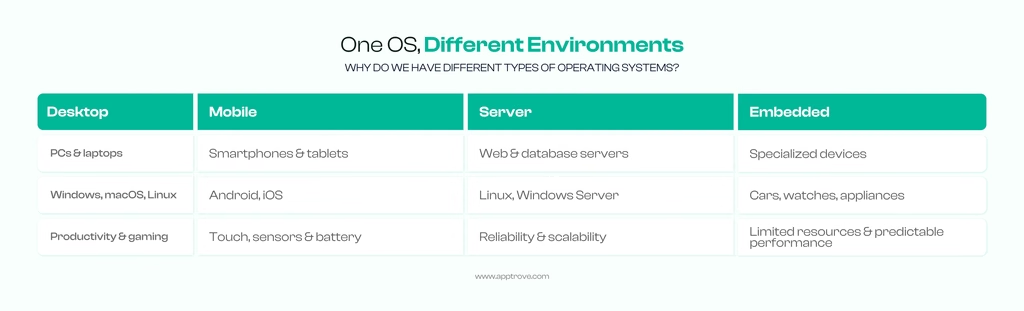
OS can be classified by the nature of the device they allow working with and how they work.
Desktop Operating System
Desktop Operating Systems are intended for home computers, i.e., PCs. They are often used with a graphical interface and can operate programs such as a web browser, office applications, creative software, games, or development software.
Some of the most commonly used types are Windows, Mac OS, and Linux distributions.
Mobile Operating Systems
Mobile operating systems are specifically made to operate smartphones and tablets. It must be able to deal with the touchscreen, camera, sensors, wireless communication, battery handling, mobile processors, and application permissions. Android and iOS are the major players in mobile operating systems.
Mobile operating systems are not like traditional desktop environments. They also put a big emphasis on power efficiency.
Server Operating Systems
Server operating systems are made to run the systems that provide services to other computers or devices. It handles web servers, databases, file storage, network services, virtual machines, and business applications.
The distributions of Linux are the ones that are generally used in servers. Windows Servers could also be used for those businesses that are working on Microsoft-based platforms.
Server operating systems stress reliability, security, scalability, and remote management.
Embedded Operating Systems
Embedded operating systems are made for specialized devices like robots or watches, not common computers. They can be used in many industries like automotive, smart appliances, healthcare devices, network facilities, etc.
These operating systems require stricter requirements than desktop systems, like limited memory, predictable performance, and special hardware compatibility.
Operating System Components
An operating system is not a mere program. It has several components which enable the computing environment to be managed.
Kernel
The kernel is the core part of the operating system. It interacts with hardware and is responsible for managing essential resources, i.e. CPU time, memory and devices.
When a software program needs to use a system resource, it may interface with the functions of the operating system, which will contact the kernel to perform the requested operation.
The kernel works in highly privileged mode since it has to gain access to more sensitive information, as it needs to control the relevant hardware and the resources of the system.
Shell
A shell is the means through which users or other applications interact with the services of the operating system. With the command line shell, the user is able to run commands by entering them.
Graphical interfaces also serve functions of shells, but they do not require users to input commands.
Device Drivers
Device drivers enable communication between the OS and specific pieces of hardware. A driver is just a set of instructions and an interface for a specific type of hardware.
File System
The file system determines how information is arranged and stored on a storage medium. Different storage technologies may be used by various operating systems and storage capacities.
The file system enables users and applications to engage with data through familiar terms like files and folders, while it also tends to the various storage structures in the background.
Comparison of Operating System and Application Software
Both operating systems and applications are types of software products, but they perform different functions. Operating systems control all processes of the computing environment and offer services to applications. Software applications have the function of allocating tasks to users. As an example, it is worth noting a word processing program that is an application, as it uses the operating system in order to interact with memory, show the data, save and retrieve files, and perform many other functional processes.
In other words, while the operating system forms the environment, applications operate in it and take care of particular tasks. Operating System and Firmware: Firmware is software that is either fixed or almost integrated with hardware devices and responsible for the management of devices at a low level of operations.
There is not always a clear distinction between firmware and operating system because some modern gadgets are equipped with multiple firmware and operating system versions. Nevertheless, it can be said that firmware is closer to hardware compared to the operating system, which offers a larger platform for applications and users.
For example, firmware like UEFI can be used to load hardware and perform the boot before the operating system is activated.
Why Do We Need Different Operating Systems?
No one operating system fits all devices and all users. The requirements for a smartphone differ from the requirements for a gaming computer. The priorities of web servers differ from the priorities of smart home devices. Industrial machines may require deterministically predictable operations, which does not matter for personal computers.
This is the reason why different operating systems are designed for different types of hardware devices, performance, safety specifications, compatibility features, characteristics of operation and resource requirements.
An operating system may also depend on the software environment. People may choose the platform because of the applications they require, the development tools they prefer and the hardware they own.
Operating System Security
Security is now among the key roles of operating systems. The operating system is at the heart of every device and thus acts as an important protective shield for data and access control.
User Authentication
Operating systems can also provide user authentication using passwords, PINs, biometrics, security keys, and other methods. Authentication determines who can access the operating system or specific resources.
Permissions
Permissions dictate what applications and users are allowed to access. An app can ask for access to be made to its camera, microphone, location, contacts, or files.
Limiting access is a significant security measure that can help reduce the threat of harm done by malware.
Updates and Security Patches
Software updates can also allow for new functionality and system enhancements as well as fixes for security vulnerabilities. Thus, keeping the operating system up to date is vital for the safety of the operating environment.
How Operating Systems Have Changed
In the past, it was much harder to interact with computers because there was much less abstraction between users and machines. Operating systems introduced many tools and functions such as multitasking, graphical interfaces, networking, user accounts, and many others.
Operating systems have become practically unseen frameworks. Users can engage with advanced computer systems through user-friendly interfaces and do not have to comprehend what goes on beneath the surface of a system.
Modern operating systems are increasingly being used for such modern technologies as virtualisation, cloud computing, container workloads, AI workloads, advanced security procedures, and distributed computing.
To sum up
The operating system represents the hidden part of the hardware, which serves the purpose of creating a proper computing environment. Each time a person launches software, saves data, connects external equipment to the computer or uses the Internet, the operating system is performing various coordination operations.
Although the operating system carries out lots of work, the result of its work is often invisible. The OS is responsible for managing processor work, memory, storage, hardware and software, user actions, permissions, and security, but all of that can be seen from a simple user interface.
Starting from personal gadgets and mobile phones to servers and cars, all operating systems are very different; nevertheless, they perform the same important function: their task is to manage the machine, give the platform, and facilitate the use of the computer.
FAQs
1. What is an operating system in simple words?
An operating system is the main software that manages the hardware of the system and provides a platform for running applications. The OS is an intermediary between a user, applications, and the equipment.
2. What are the key functions of the operating system?
Key operating system functions include managing processes, memory, files, devices, security, resource allocation, and user interfaces.
3. What are operating system examples?
Examples include the most widespread operating systems: Windows, macOS, Linux, Android, and iOS. Various operating systems serve different devices and computing environments.
4. Is the operating system a type of software?
Yes, the OS is a type of system software. It differs from application software, which is used for carrying out particular tasks.
5. What is the kernel of an operating system?
The kernel can be defined as the most important part of an operating system. The kernel takes care of the essential system resources, including CPU, memory, and hardware communication, as well as the core services that are employed by applications.
from Apptrove https://apptrove.com/operating-system/
via Apptrove


Comments
Post a Comment