What’s New on Apptrove: More Accurate Attribution and Clearer Reporting
When you’re running campaigns across multiple advertising platforms, getting a consistent picture of performance isn’t always straightforward. One platform may report a different number of conversions than another, multiple partners may claim credit for the same install, and returning users can sometimes get grouped with new acquisitions.
These differences make it harder for marketing teams to reconcile reports, understand where conversions are coming from, and evaluate campaign performance with confidence.
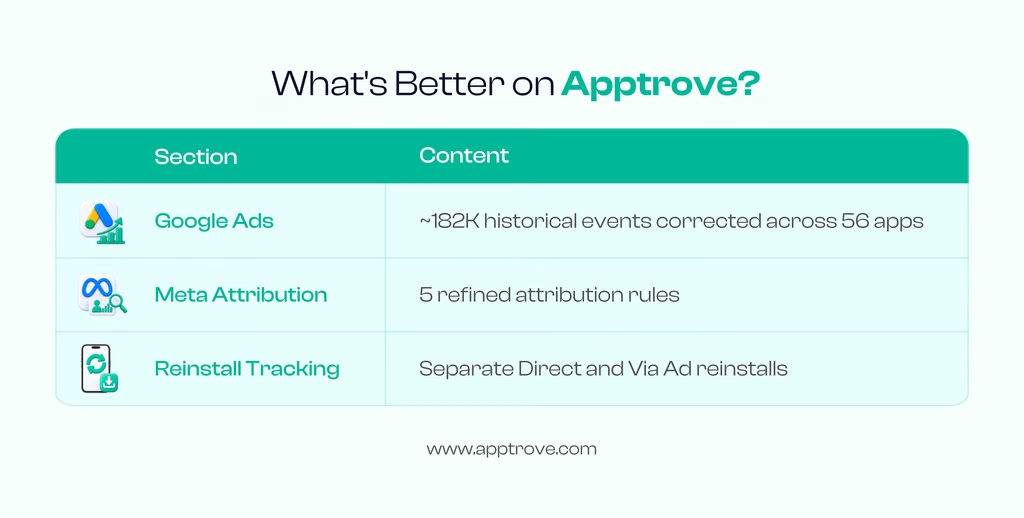
At Apptrove, we’re working to make that process clearer. We’ve introduced several enhancements to how Google Ads events are attributed, how competing Meta attribution claims are evaluated, and how app reinstalls appear in reports.
Here’s a closer look at what’s changed and what it means for advertisers.
Bringing Google Ads Attribution Closer to Google’s Reporting
When advertisers compare their Apptrove reports with Google Ads dashboards, differences in reported conversions can make performance reconciliation difficult.
To address this, we’ve refined how Apptrove handles Google Ads in-app event attribution. Events are now credited to Google only when they follow Google’s own confirmation logic. This means events that Google doesn’t claim are no longer attributed to Google Ads in Apptrove.
The enhancement is now live for all advertisers.
More Consistent In-App Event Reporting
The change goes beyond how new events are processed. We’ve also corrected approximately 182,000 historical events across 56 apps and re-synced the corresponding reports.
This helps bring previously reported numbers closer to Google’s confirmed event data.
Closer Alignment Across Apps
We’ve also seen improvements in how individual apps align with Google’s reporting.
Four apps that previously reported higher numbers than Google are now within a ±5% difference of Google’s figures. The number of organisations experiencing overcounting has also decreased from eight to five.
These corrections help reduce reporting discrepancies and give advertisers a more consistent view of their Google Ads performance.
Better Visibility Across Multiple Google Ads Accounts
For advertisers managing campaigns through multiple Google Ads accounts, reconciling performance can involve checking several dashboards individually.
We’ve made this easier by introducing account-level contribution visibility in the Partner report.
Advertisers can now see how much each Google Ads account contributes to the reported performance, making it easier to compare Apptrove’s numbers with the corresponding Google Ads dashboards.
This gives teams a clearer understanding of where their reported conversions are coming from, especially when managing multiple accounts for the same app.
Making Meta Install Attribution More Consistent
What happens when Meta and another advertising partner both claim the same app install?
This is where attribution rules become particularly important. Different interaction signals, including clicks, impressions, device identifiers, and referrer information, can influence how an install is evaluated.
To make these decisions more consistent, we’ve refined Apptrove’s Meta attribution logic. The updated approach evaluates competing attribution claims using a clearer set of rules.
Here’s how it works.
1. Verified Meta Referrers Take Priority
When a verified Meta referrer is available, it takes precedence over IP-based attribution matches.
This prioritises verified referrer information when evaluating an install.
2. Device ID and Click ID Matches Follow Last-Click Logic
When an attribution match is based on a device ID or click ID, Meta receives credit only if its click occurred more recently than the competing interaction.
SDK-supplied partner IDs are always retained.
3. Meta Impressions Don’t Override Another Partner’s Click
An ad impression alone should not replace another partner’s qualifying click.
Under the refined logic, a Meta ad view will not override another advertising partner’s click when determining install attribution.
4. Google Ads Attribution Is Still Evaluated
Google Ads continues to be considered when evaluating competing attribution claims.
Meta retains the install only when its qualifying click occurred after Google’s.
5. Internal Notes Explain Attribution Decisions
Understanding why a particular partner received or didn’t receive attribution can be just as important as the final result.
To make investigations easier, internal notes now record why Meta was or wasn’t attributed.
This provides additional context when reviewing attribution decisions.
Available at the Organisation Level
The refined Meta attribution logic is enabled at the organisation level and remains switched off by default.
Organisations can enable it when required.
By applying these rules, Apptrove provides a more structured way to evaluate competing install claims while retaining the relevant partner attribution signals.
See Reinstalls Separately from New Installs
Not every installation represents a new user.
Someone who has previously installed an app may return and install it again within the re-attribution window. However, when reinstalls and new installs appear together in reporting, understanding actual acquisition activity can become more difficult.
To give advertisers a clearer picture, Apptrove now supports separate reinstall reporting.
The feature allows advertisers to distinguish between regular installs and reinstalls, with additional visibility into whether a reinstall happened directly or following an advertising interaction.
Understand Direct and Ad-Driven Reinstalls
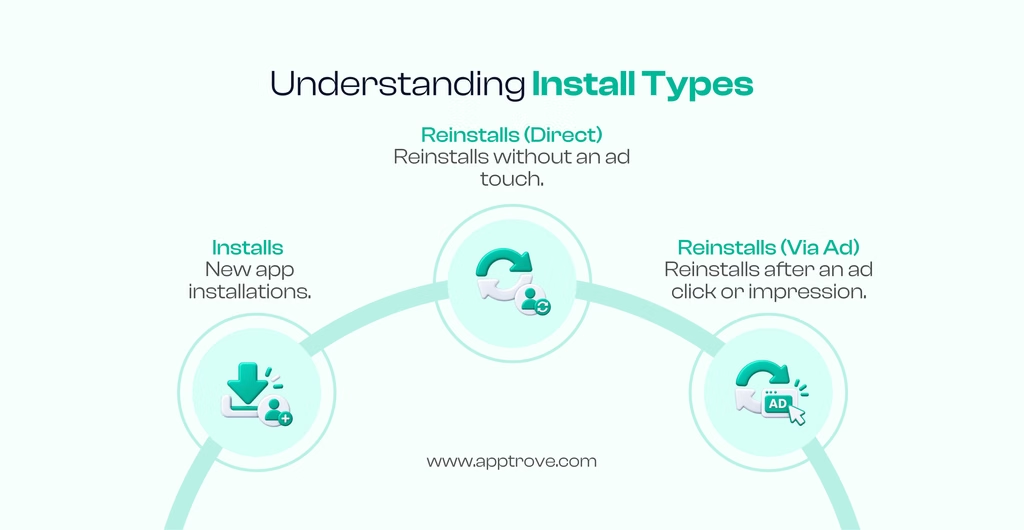
Once reinstall tracking is enabled, two additional reporting columns become available:
Reinstalls (Direct)
These are reinstalls that happen without an ad touch.
Reinstalls (Via Ad)
These are reinstalls that happen after an ad click or impression.
Organic reinstalls will no longer be included in the Installs count once the feature is enabled.
Importantly, installs credited to advertising partners remain unchanged. This means the reporting separation does not affect partner attribution, campaign costs, or billing.
More Reinstall Details in the Install Log
We’ve also introduced additional options in the Install Log to make it easier to identify and investigate reinstall activity.
Advertisers will now have access to:
- Install Type Filter: Filter installation records by Installs, Reinstalls Direct, and Reinstalls Via Ad.
- Is Reinstall: Identify whether an installation is a reinstall.
- Is Re-attributed Install: Identify whether an installation has been re-attributed.
These additions make it easier to distinguish different installation types without having to interpret every record individually.
How to Enable Reinstall Tracking
The feature is currently enabled for HT Digital.
Other advertisers can enable it themselves by navigating to:
App Settings → Track Reinstall
Before enabling it, there are a few important things to keep in mind:
- It cannot be turned off: Reinstall tracking is a one-way setting. Once enabled, it cannot be disabled.
- Historical data remains unchanged: The reporting separation starts only from the date the feature is enabled. Earlier data will remain as it was.
- Access is limited to advertisers: The feature is visible to advertiser logins only and is not available to partners or agencies.
These considerations are important when deciding when to activate the functionality, particularly for teams that rely on historical reporting comparisons.
Making Campaign Measurement Easier to Understand
Understanding campaign performance requires more than looking at the number of installs or conversions generated. Advertisers also need to know how those conversions are attributed, how different advertising sources contribute, and what happens when existing users return to an app.
With these enhancements, Apptrove is making it easier to work with that information.
Google Ads reporting now follows Google’s event confirmation more closely, Meta attribution follows refined evaluation rules when multiple sources claim an install, and advertisers can distinguish reinstalls from regular installs in their reports.
The goal is to give marketing teams better visibility into their campaign data, make reporting easier to reconcile, and provide more context when evaluating acquisition performance.
As we continue improving Apptrove, our focus remains on making measurement more transparent, reporting more useful, and campaign decisions more informed.
from Apptrove https://apptrove.com/attribution-enhancements-november/
via Apptrove


Comments
Post a Comment